Krishify
Krishify
Krishify offers multiple products, including a farmer community app that connects farmers through groups based on their location and crops. In addition to its B2C features, it provides B2B solutions like crop traceability, farm digitalisation, health tracking, and advisory services, driving innovation in agriculture.
I was the sole designer at Krishify, responsible for the UX of all projects, including the Farmer app, Operator app, website, dashboards (Farmtrac and Farmverse), and multiple pitch decks. Through our collaborative efforts, we gained over 1 crore registered farmers and attracted clients like Swiggy, Tata Rallis, Harvard, and more.
Krishify offers multiple products, including a farmer community app that connects farmers through groups based on their location and crops. In addition to its B2C features, it provides B2B solutions like crop traceability, farm digitalisation, health tracking, and advisory services, driving innovation in agriculture.
I was the sole designer at Krishify, responsible for the UX of all projects, including the Farmer app, Operator app, website, dashboards (Farmtrac and Farmverse), and multiple pitch decks. Through our collaborative efforts, we gained over 1 crore registered farmers and attracted clients like Swiggy, Tata Rallis, Harvard, and more.
ROLE
ROLE
Product Designer
Product Designer
CATEGORY
CATEGORY
Agri-Tech
Agri-Tech
TIMELINE
TIMELINE
1.5 Year
1.5 Year
Research
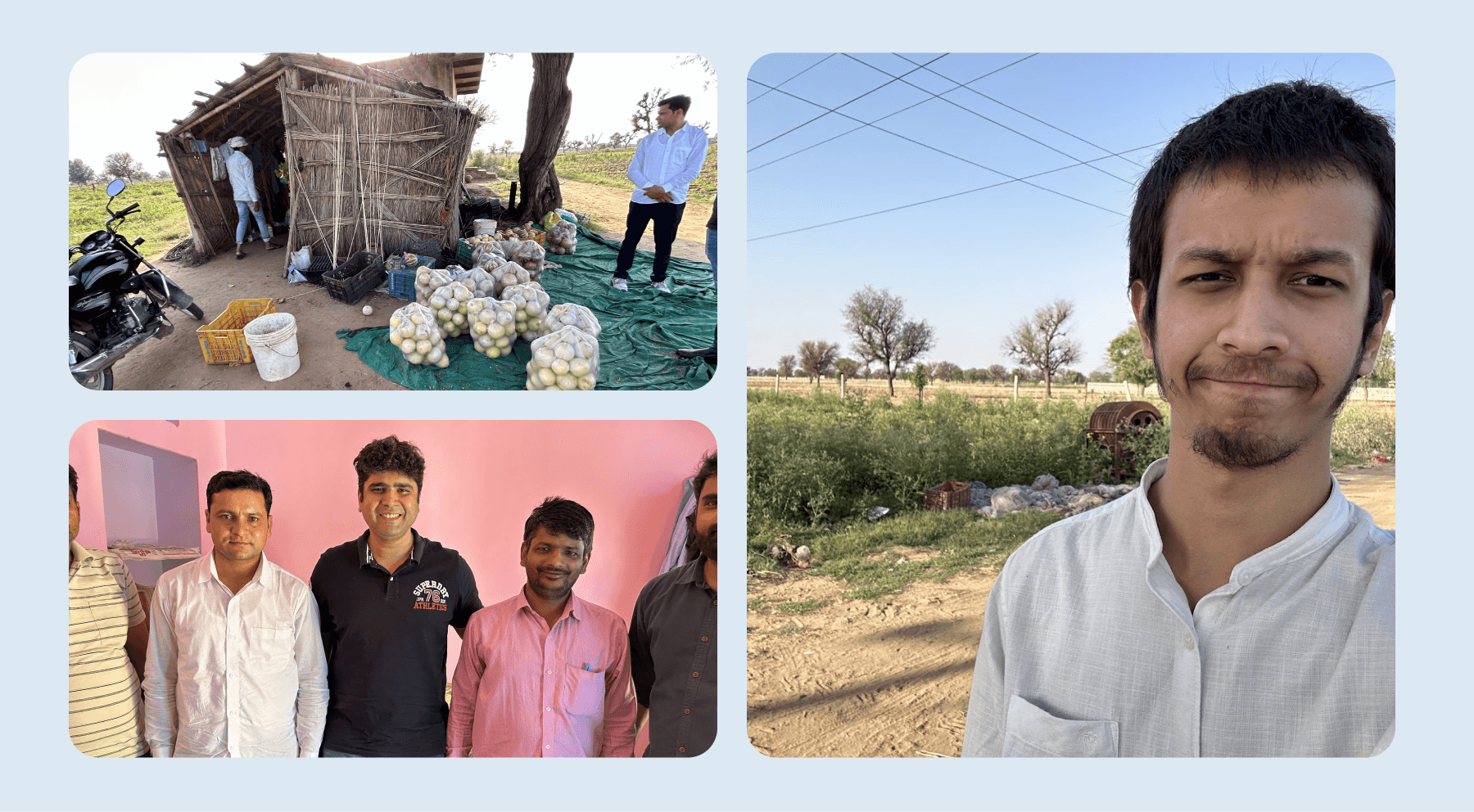
The Krishify community app is available in multiple languages, with a primary focus on Hindi. Before creating the community, we visited villages in various regions multiple times to understand the features farmers were looking for, whether they could comprehend the prototype, and what other applications they use. We also explored features they hadn’t found elsewhere and the type of content they would prefer.
I personally visited some villages, and in addition, we onboarded progressive farmers from several villages to gather collective feedback. This feedback helps us continuously improve the experience for farmers, field agents, and clients.
Research
The Krishify community app is available in multiple languages, with a primary focus on Hindi. Before creating the community, we visited villages in various regions multiple times to understand the features farmers were looking for, whether they could comprehend the prototype, and what other applications they use. We also explored features they hadn’t found elsewhere and the type of content they would prefer.
I personally visited some villages, and in addition, we onboarded progressive farmers from several villages to gather collective feedback. This feedback helps us continuously improve the experience for farmers, field agents, and clients.
Farmer App (Community)
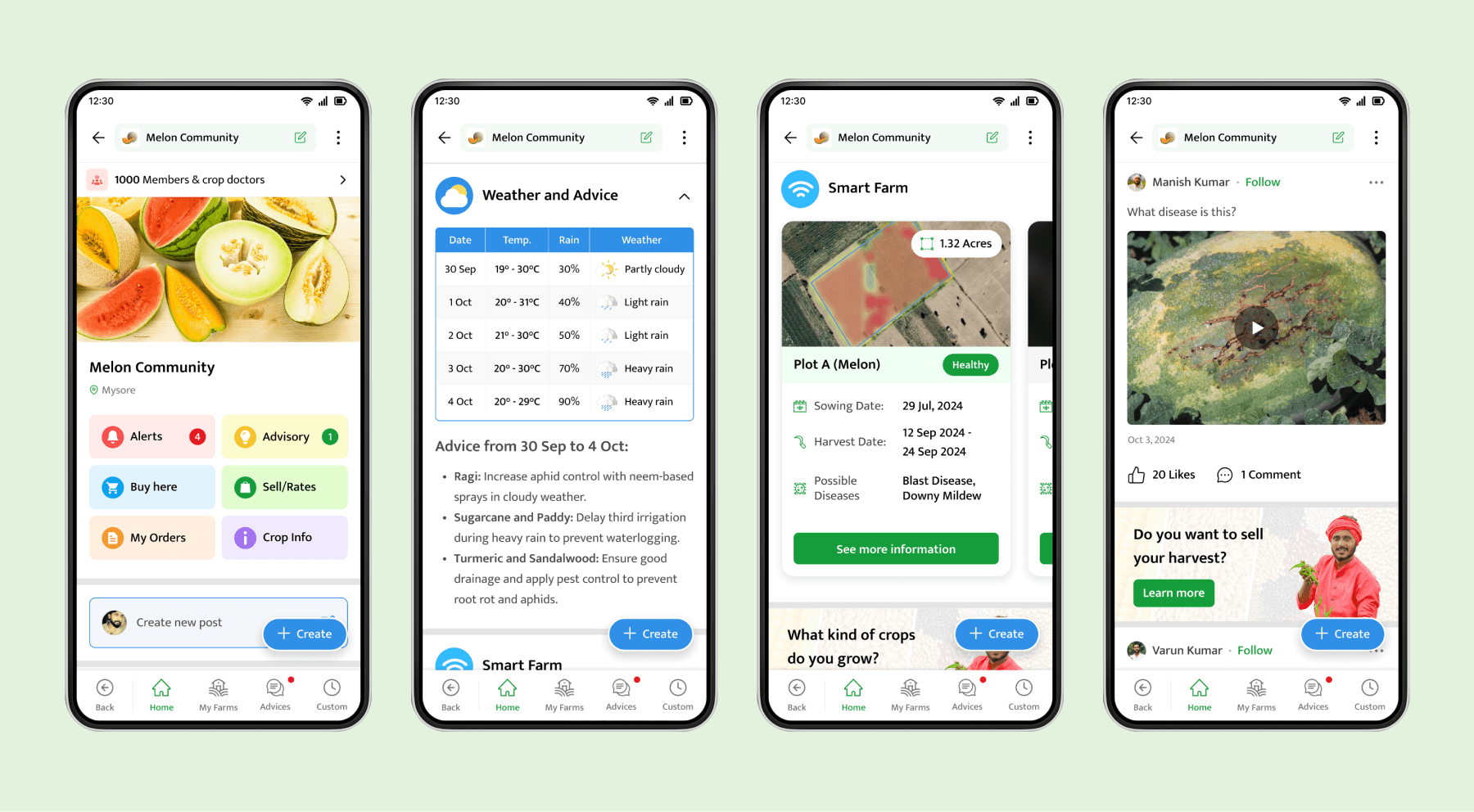
When farmers sign up for the Krishify app or are onboarded by field agents, they are added to communities based on their crop preferences and location. These communities offer advisory services, opportunities to sell harvests, buy products, explore crop directories, and engage with other members.
In the community feed, farmers can view posts from other farmers or agronomists and share their own queries. Additionally, the feed provides weather updates and insights on their smart farms (geo-marked plots).
Farmer App (Community)
When farmers sign up for the Krishify app or are onboarded by field agents, they are added to communities based on their crop preferences and location. These communities offer advisory services, opportunities to sell harvests, buy products, explore crop directories, and engage with other members.
In the community feed, farmers can view posts from other farmers or agronomists and share their own queries. Additionally, the feed provides weather updates and insights on their smart farms (geo-marked plots).
Farmer App (Smart Farm & Advisory)
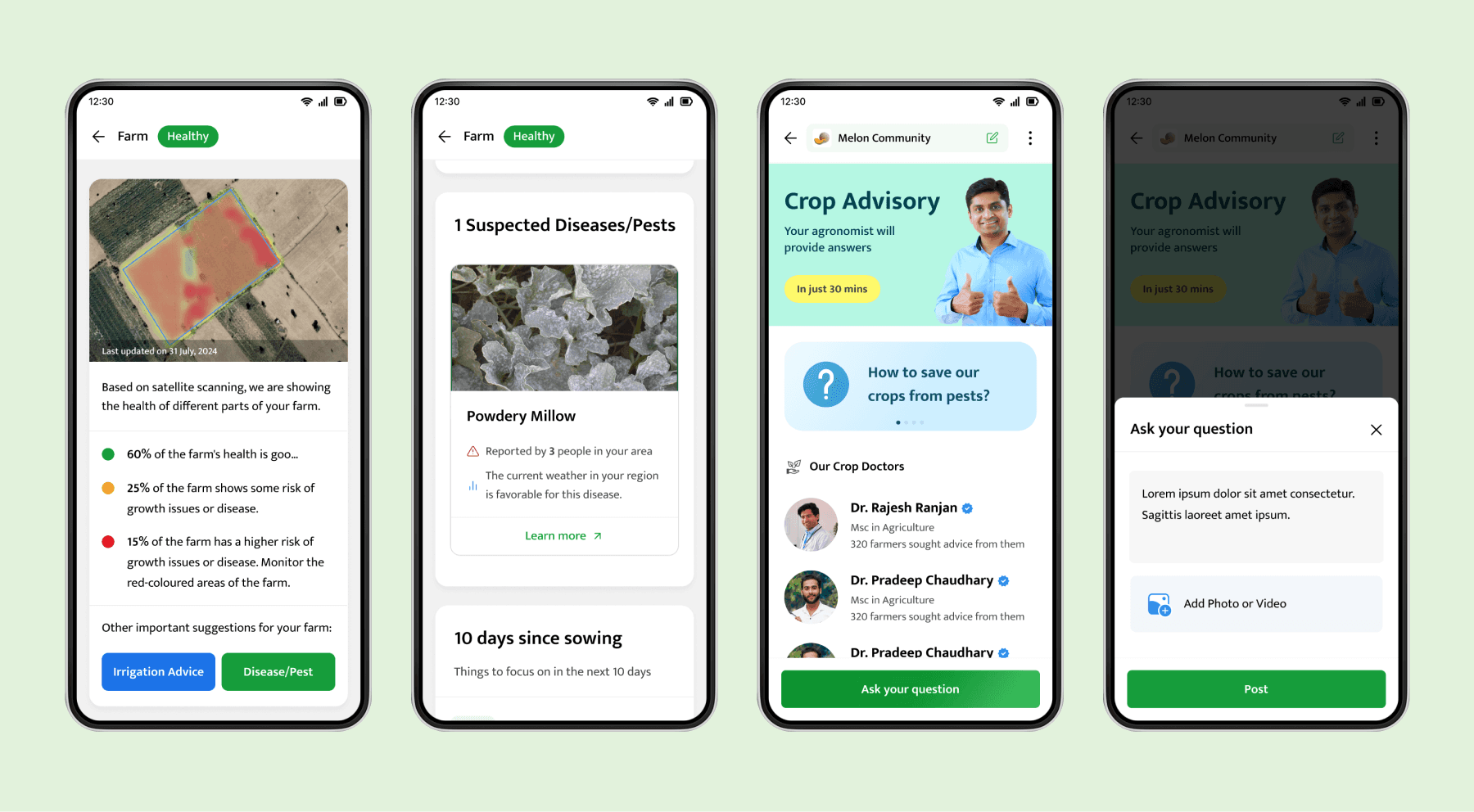
Smart farm refers to a farmer's geo-marked plots, added by field agents through the operator app. Once added, the plot is scanned via satellite, and based on the report, we provide farmers with insights on plot health. Additionally, we offer farming advice and alerts on potential diseases, using satellite data, weather patterns, and nearby reports.
In the advisory section, farmers can ask any crop-related queries, which are answered by agronomists both on the app and via WhatsApp.
Farmer App (Smart Farm & Advisory)
Smart farm refers to a farmer's geo-marked plots, added by field agents through the operator app. Once added, the plot is scanned via satellite, and based on the report, we provide farmers with insights on plot health. Additionally, we offer farming advice and alerts on potential diseases, using satellite data, weather patterns, and nearby reports.
In the advisory section, farmers can ask any crop-related queries, which are answered by agronomists both on the app and via WhatsApp.
Farmer App (Crop Directory & Sell Crop)
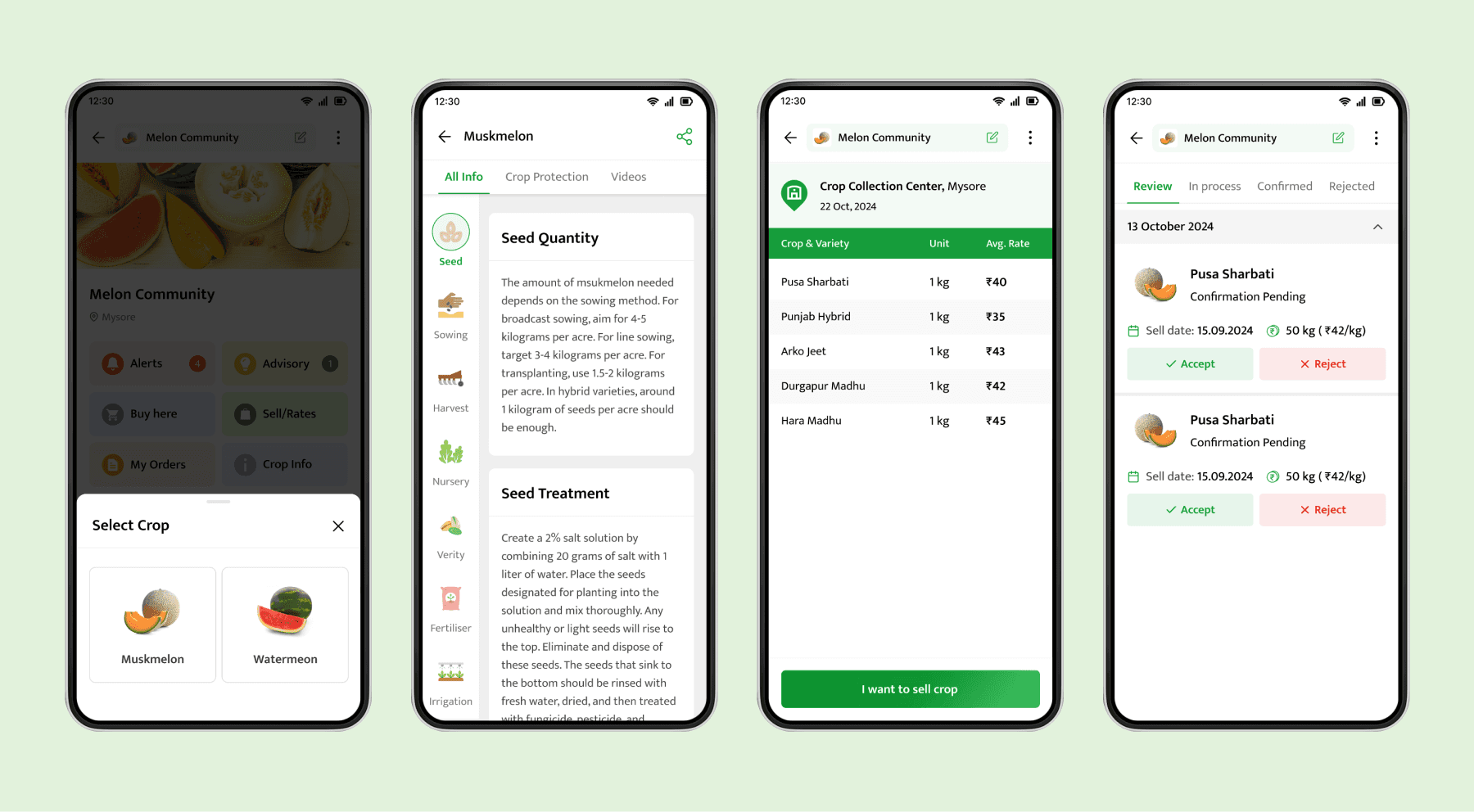
In the crop directory, farmers can select a crop (in some cases, one community may have multiple crops) to access detailed information on best farming practices and related videos.
When their harvest is ready, they can view current offered rates and submit a request to sell. After agents connect with them, an offer is created in the operator app for the farmer to accept, which they can then track.
Farmer App (Crop Directory & Sell Crop)
In the crop directory, farmers can select a crop (in some cases, one community may have multiple crops) to access detailed information on best farming practices and related videos.
When their harvest is ready, they can view current offered rates and submit a request to sell. After agents connect with them, an offer is created in the operator app for the farmer to accept, which they can then track.
Farmer App (Buy Products)
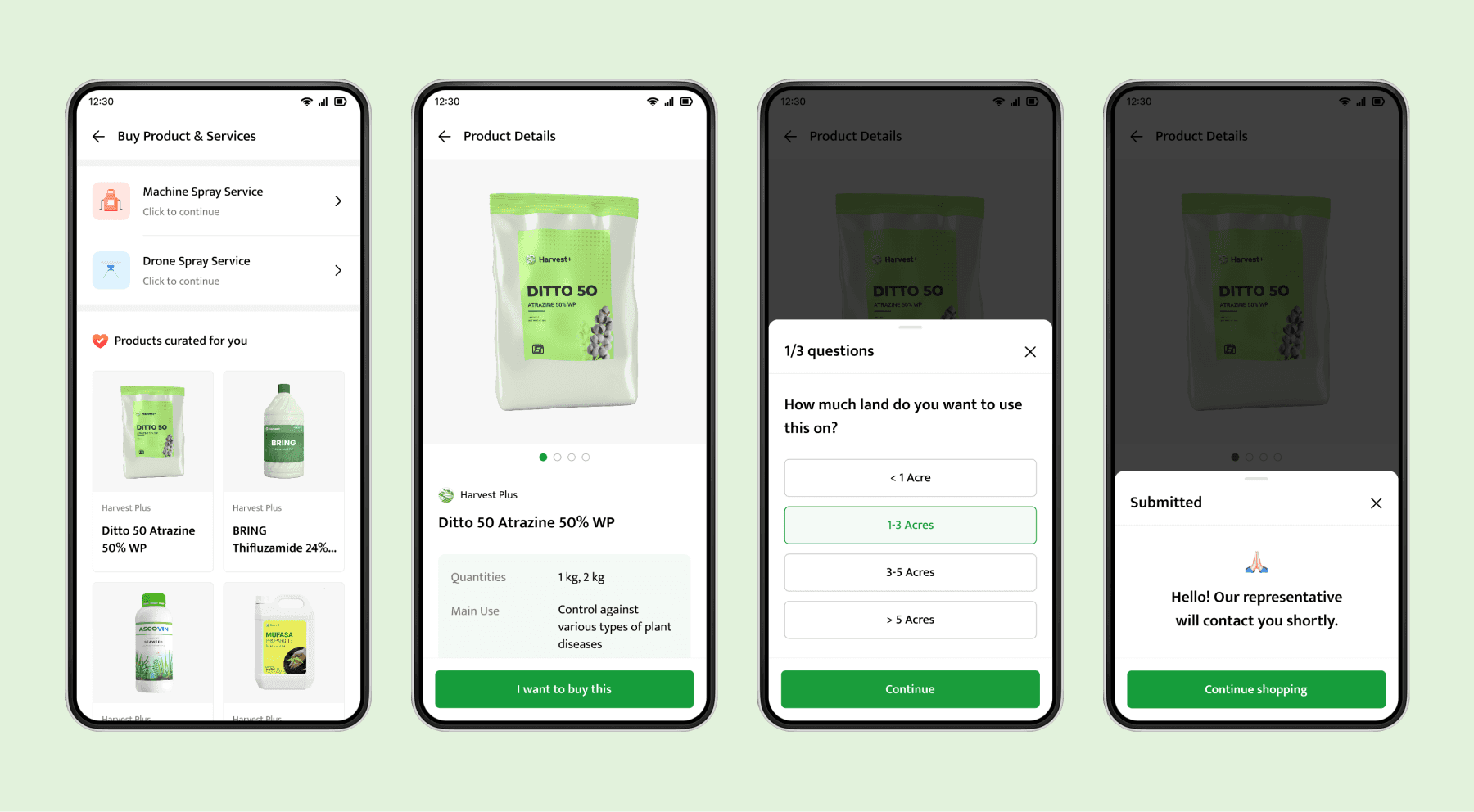
Currently, Krishify does not manage end-to-end e-commerce. Our primary goal in the buying flow is to capture the farmer's intent and share this information with our brand partners. The brand partners then handle negotiations, which is why we cannot display any prices.
Farmer App (Buy Products)
Currently, Krishify does not manage end-to-end e-commerce. Our primary goal in the buying flow is to capture the farmer's intent and share this information with our brand partners. The brand partners then handle negotiations, which is why we cannot display any prices.
Operator App (Progress & Tasks)
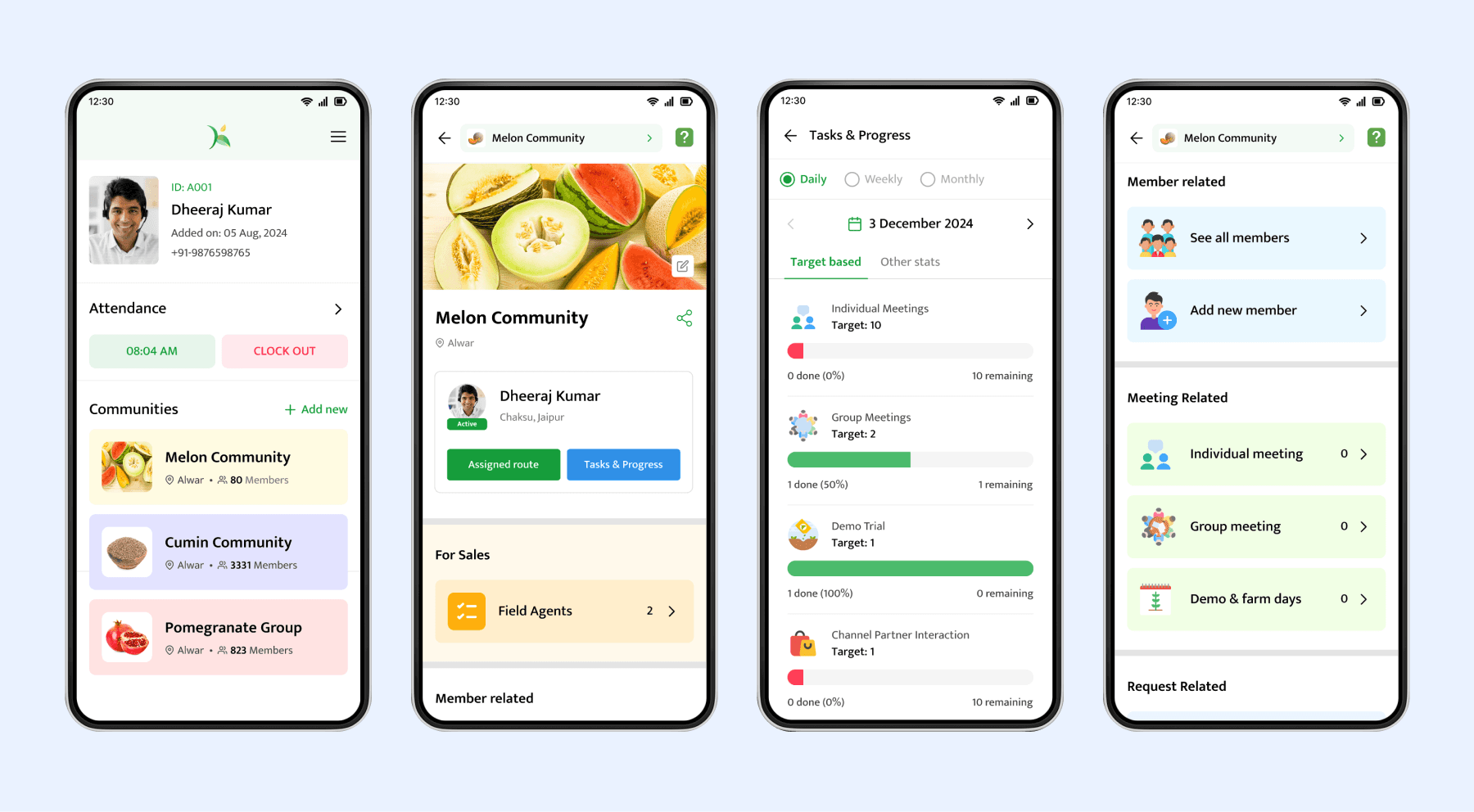
Just like the farmer app, operators on the operator app also need to select a community. They can mark their attendance and track their history on the app. Within the community, operators perform tasks on specific routes assigned by their sales team. Krishify has worked with clients like Swiggy, Tata Rallis, etc., who also required a management micro-SaaS app for their field agents, and it works effectively for them as well.
Operators or Sales Managers can track their progress on a daily, weekly, or monthly basis. On the operator app, different operators have access to different types of tasks, which are modular based on requirements.
Operator App (Progress & Tasks)
Just like the farmer app, operators on the operator app also need to select a community. They can mark their attendance and track their history on the app. Within the community, operators perform tasks on specific routes assigned by their sales team. Krishify has worked with clients like Swiggy, Tata Rallis, etc., who also required a management micro-SaaS app for their field agents, and it works effectively for them as well.
Operators or Sales Managers can track their progress on a daily, weekly, or monthly basis. On the operator app, different operators have access to different types of tasks, which are modular based on requirements.
Operator App (Farmer Actions)
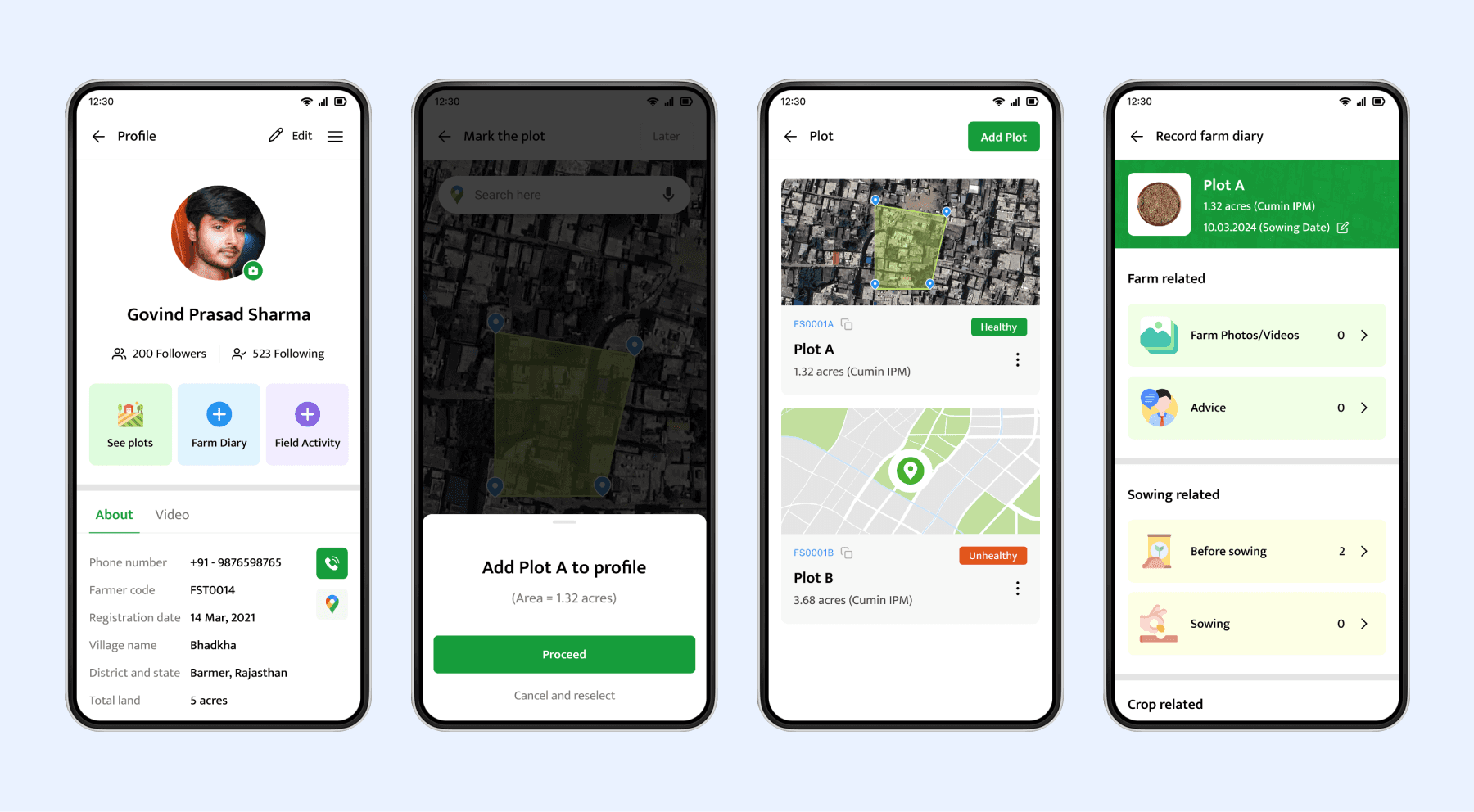
An operator can also perform tasks for individual farmers to maintain their farm diary, which can be viewed on the dashboard. This includes marking the plot's geo-location and adding farming practices based on the crop grown during a specific season.
Operator App (Farmer Actions)
An operator can also perform tasks for individual farmers to maintain their farm diary, which can be viewed on the dashboard. This includes marking the plot's geo-location and adding farming practices based on the crop grown during a specific season.
Operator App (Demo Trial)
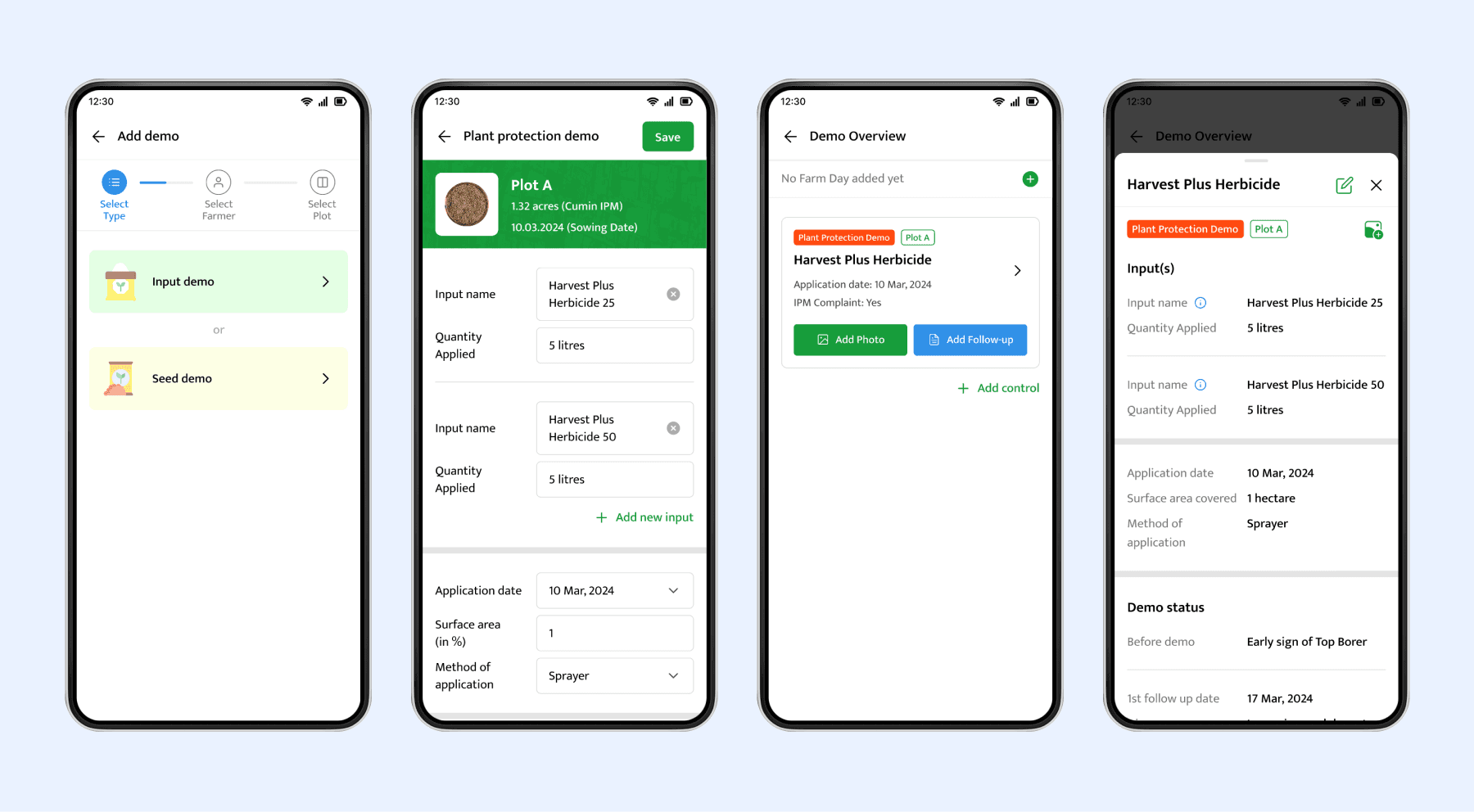
One of the main tasks for these operators is to promote products (fertilizers, seeds, pesticides, etc.). First, they select a plot where they will perform the demo. They can also add a control plot (using a different product or no product at all) to help compare the results with the demo. The operators track the progress of the demo over time to assess its effectiveness.
In addition to these tasks, operators have other responsibilities during field visits, such as onboarding farmers, conducting group meetings, making buying offers, and more.
Operator App (Demo Trial)
One of the main tasks for these operators is to promote products (fertilizers, seeds, pesticides, etc.). First, they select a plot where they will perform the demo. They can also add a control plot (using a different product or no product at all) to help compare the results with the demo. The operators track the progress of the demo over time to assess its effectiveness.
In addition to these tasks, operators have other responsibilities during field visits, such as onboarding farmers, conducting group meetings, making buying offers, and more.
Dashboard (Overview)
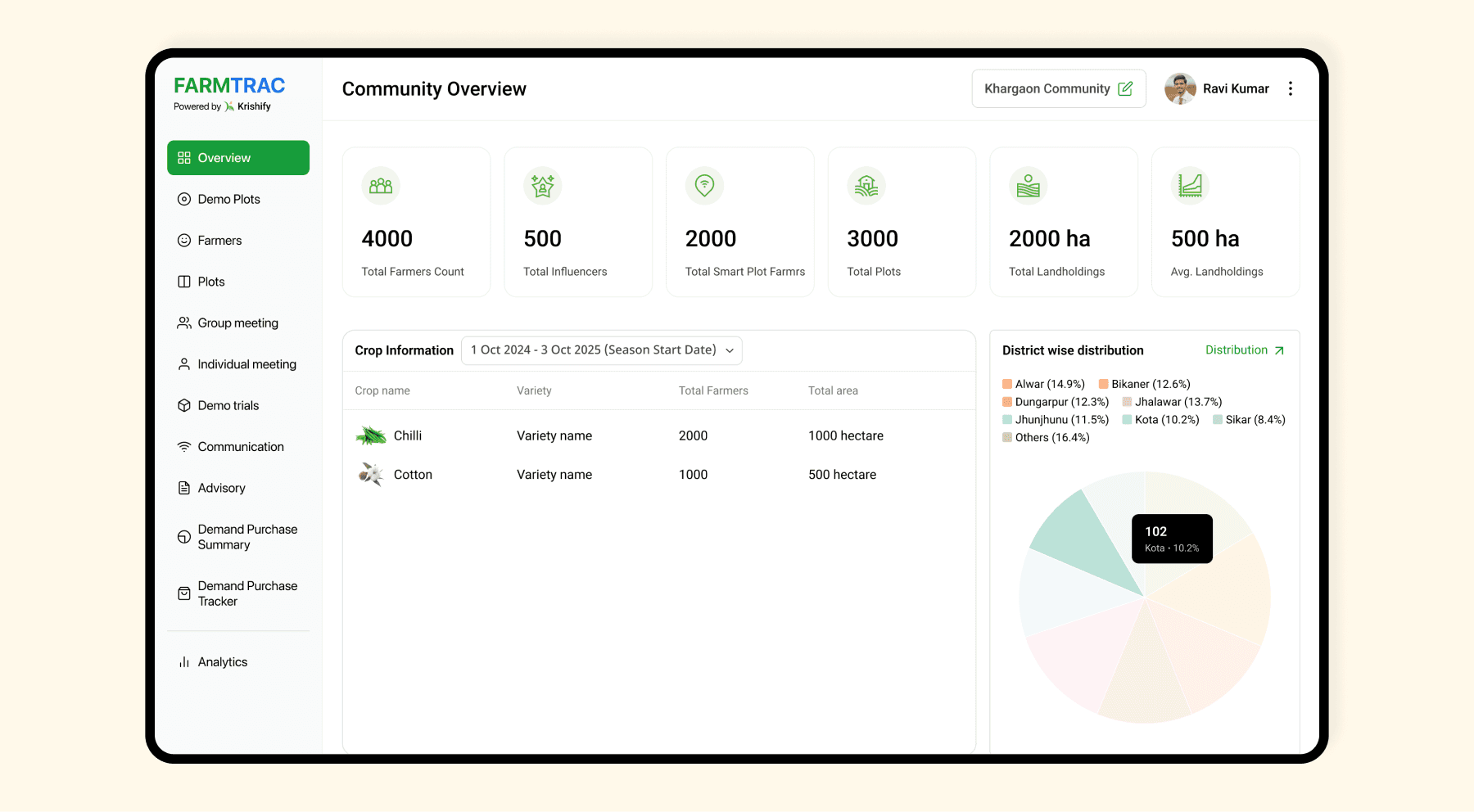
This page provides an overview of the total number of farmers and the activities happening within a specific community. It displays information such as crop type, variety, district-wise distribution of farmers, and more.
Dashboard (Overview)
This page provides an overview of the total number of farmers and the activities happening within a specific community. It displays information such as crop type, variety, district-wise distribution of farmers, and more.
Dashboard (Overview)
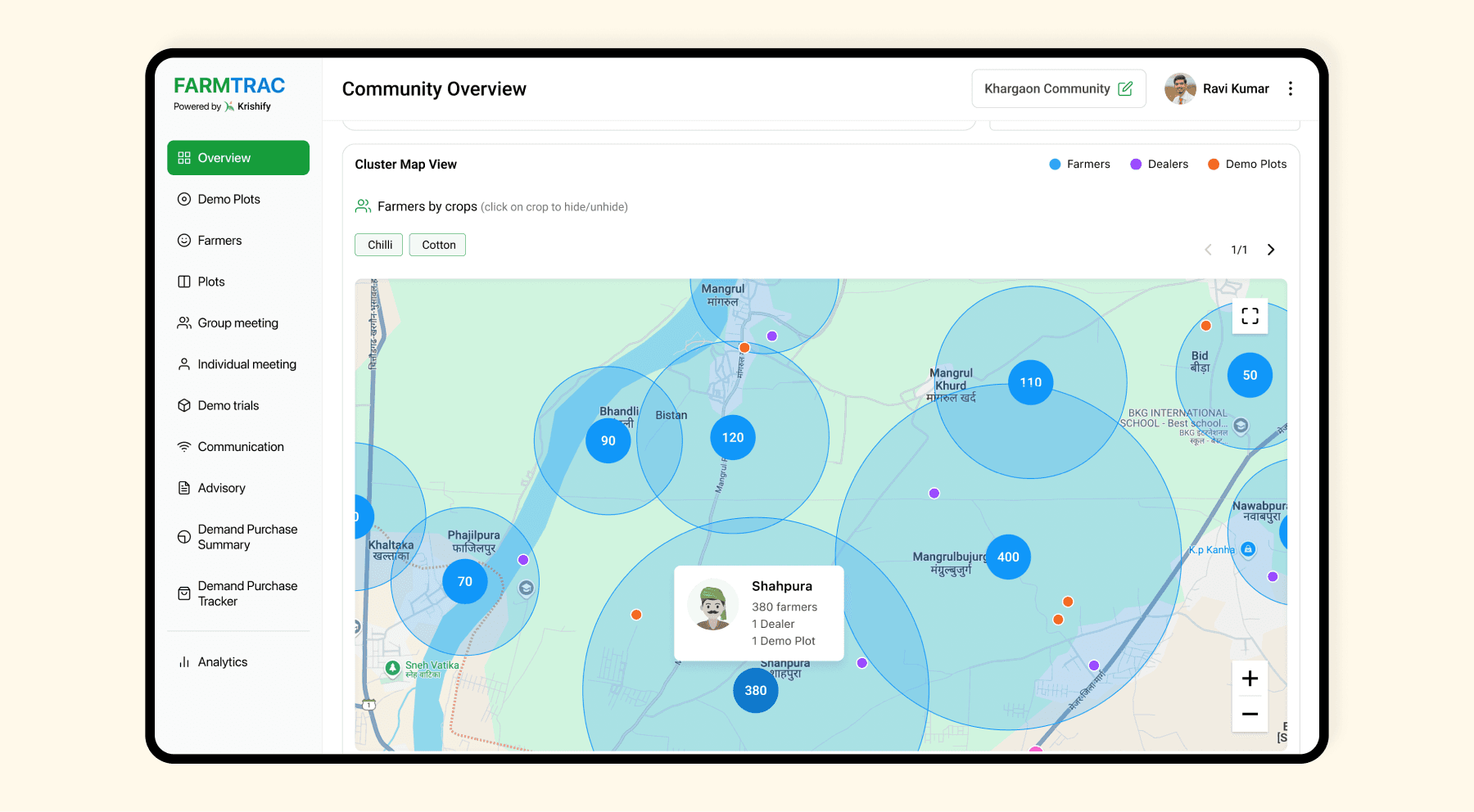
The overview also features a clustered map view displaying farmers, dealers (retailers), and demo plots. This provides the admin with a clear visualisation of where the majority of farmers are located and helps identify areas for upcoming product demos or group meetings.
Dashboard (Overview)
The overview also features a clustered map view displaying farmers, dealers (retailers), and demo plots. This provides the admin with a clear visualisation of where the majority of farmers are located and helps identify areas for upcoming product demos or group meetings.
Dashboard (Demo Plots)
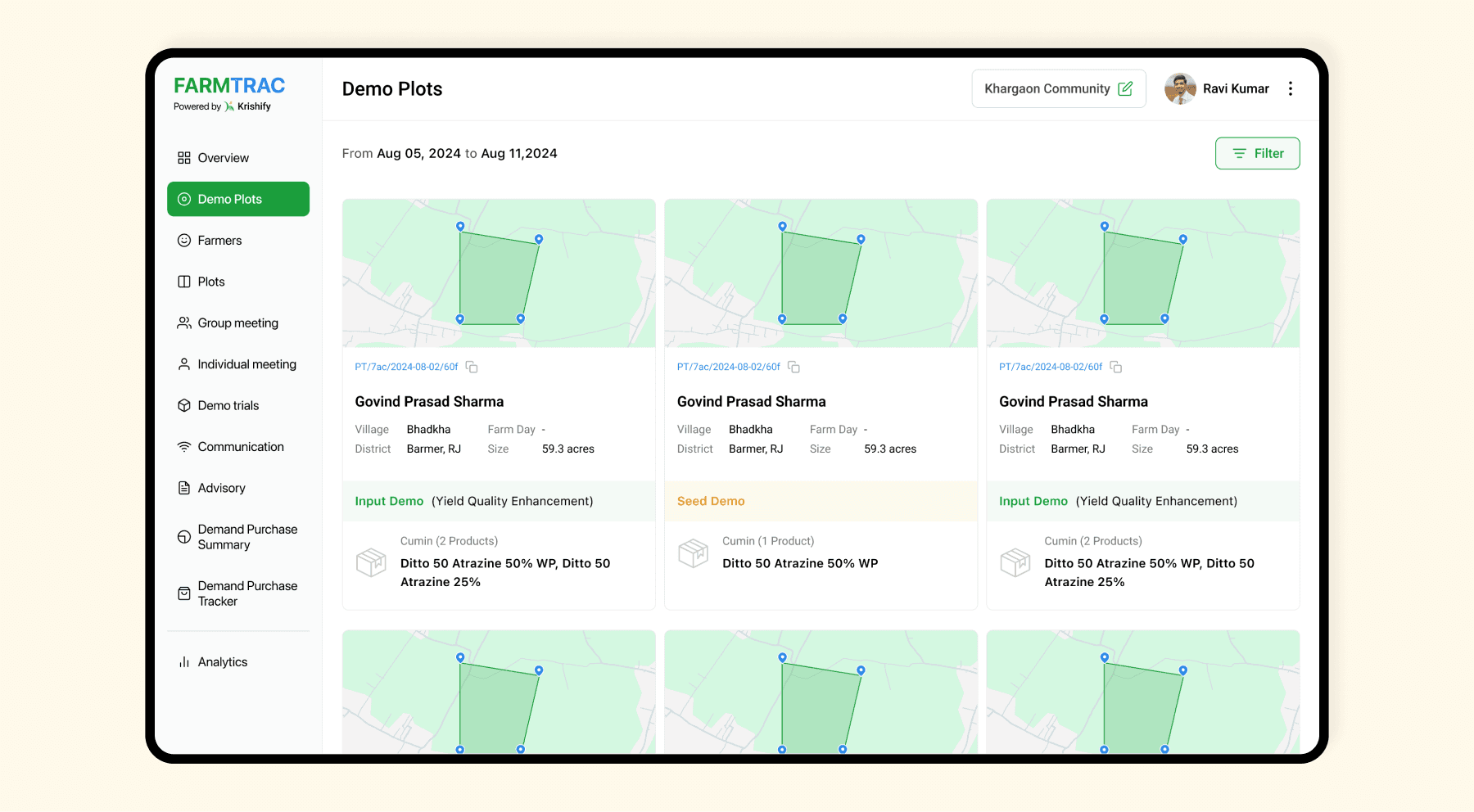
All demo trials conducted by operators (field agents) are displayed here. Filters for location, date, and product can be applied to narrow down the results to the desired information.
Dashboard (Demo Plots)
All demo trials conducted by operators (field agents) are displayed here. Filters for location, date, and product can be applied to narrow down the results to the desired information.
Dashboard (Demo Trial Comparison)
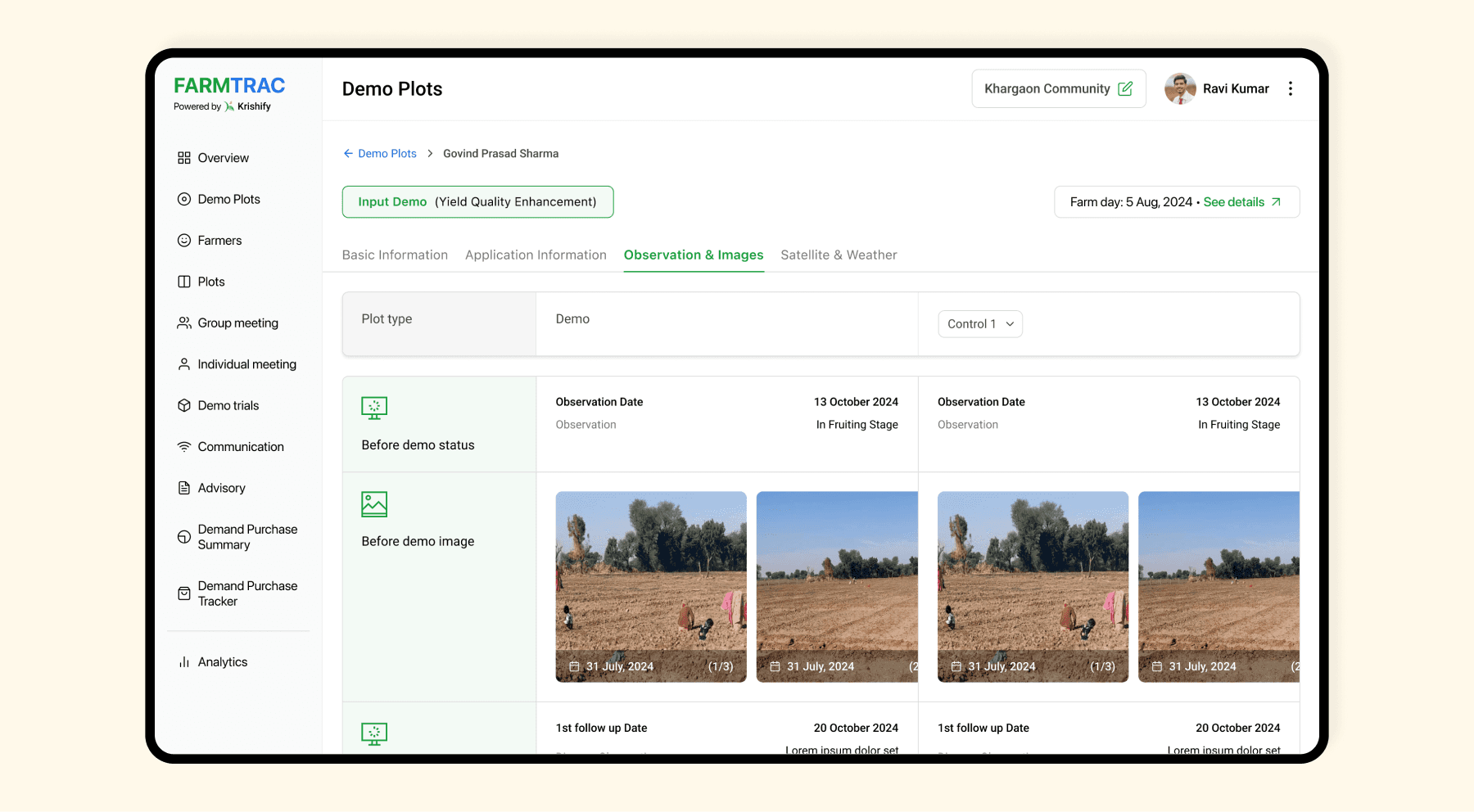
This page allows for easy comparison of the demo plot’s performance against a control (whether using another product or no product). It displays details such as product name, quantity, method of application, plot numbers, and more. Additionally, we can view observations recorded by operators at specified intervals and satellite data, including NDVI graphs through an API.
Dashboard (Demo Trial Comparison)
This page allows for easy comparison of the demo plot’s performance against a control (whether using another product or no product). It displays details such as product name, quantity, method of application, plot numbers, and more. Additionally, we can view observations recorded by operators at specified intervals and satellite data, including NDVI graphs through an API.
Dashboard (Farmer Profile)
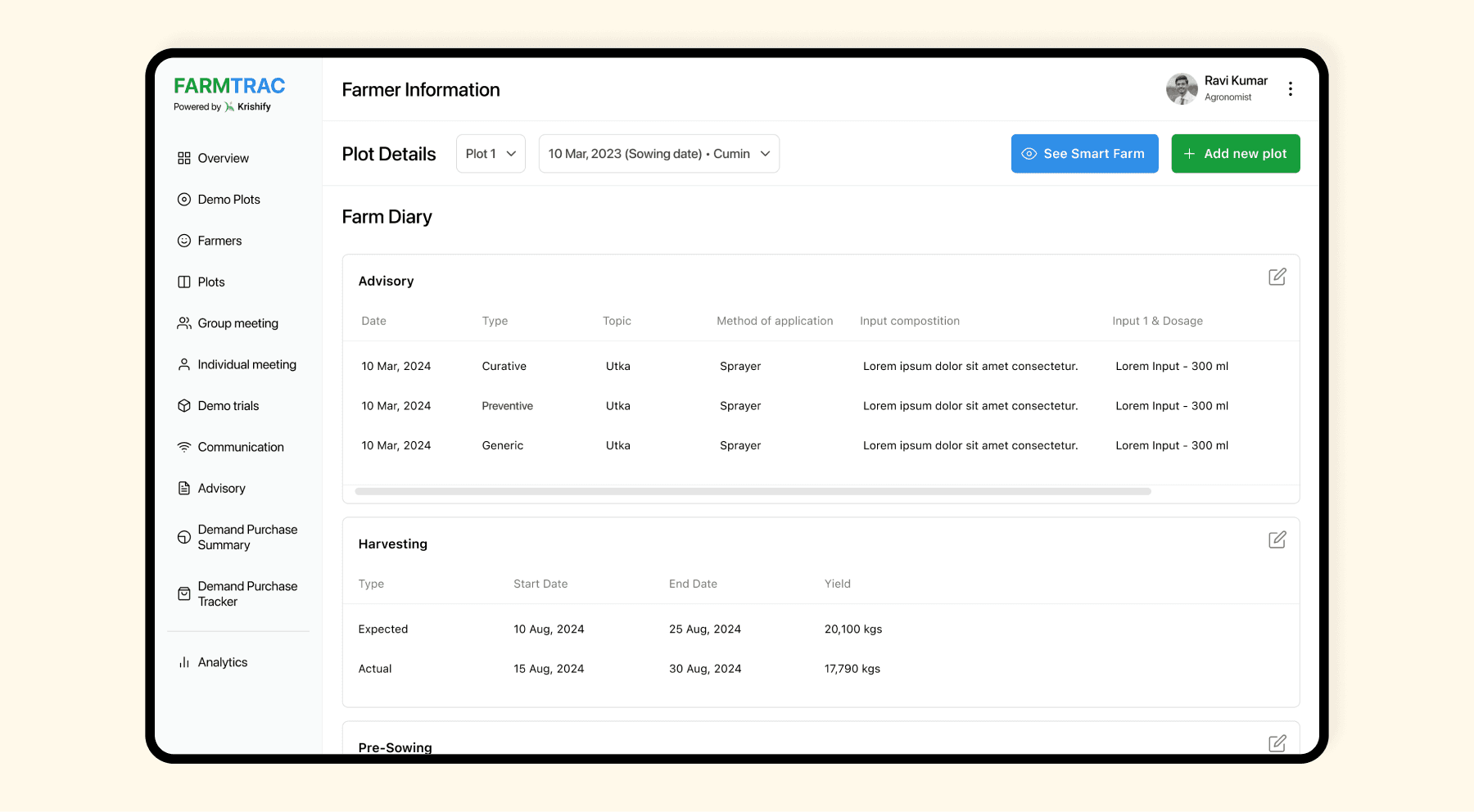
The admin can select any farmer from the farmer tab and choose a specific plot for a given season to view the farm diary. While this diary is initially maintained by operators through the operator app, both admins and supervisors have the ability to edit it as well.
Dashboard (Farmer Profile)
The admin can select any farmer from the farmer tab and choose a specific plot for a given season to view the farm diary. While this diary is initially maintained by operators through the operator app, both admins and supervisors have the ability to edit it as well.
Dashboard (Advisory)
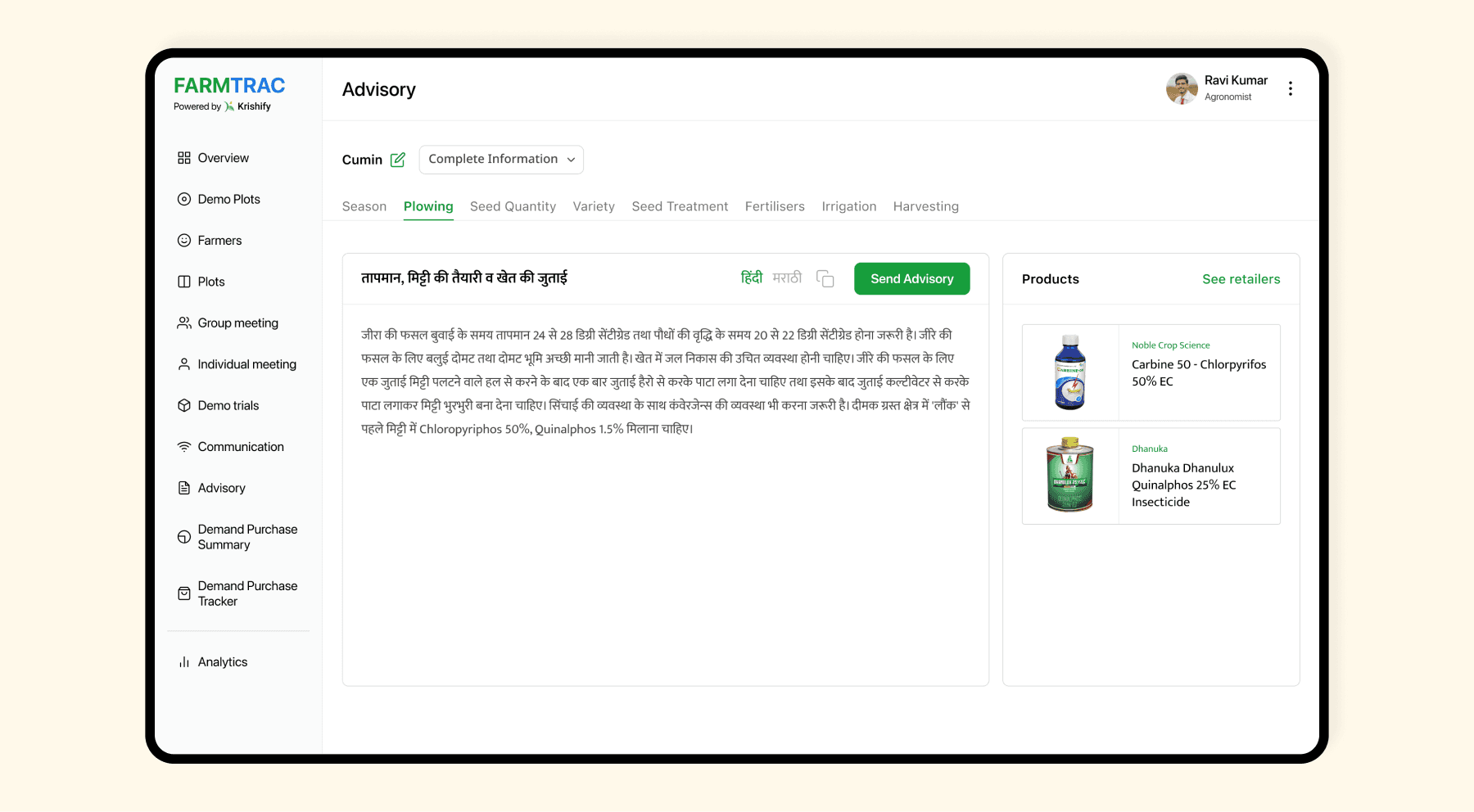
We have a crop information directory, which is also used to send advisory. Users can select a crop and choose whether they want to view complete farming information or crop protection details. The advisory is available topic-wise, and users can change the language. Additionally, they can send the advisory to specific farmers via WhatsApp or SMS using their phone numbers.
Dashboard (Advisory)
We have a crop information directory, which is also used to send advisory. Users can select a crop and choose whether they want to view complete farming information or crop protection details. The advisory is available topic-wise, and users can change the language. Additionally, they can send the advisory to specific farmers via WhatsApp or SMS using their phone numbers.
Dashboard (Analytics)
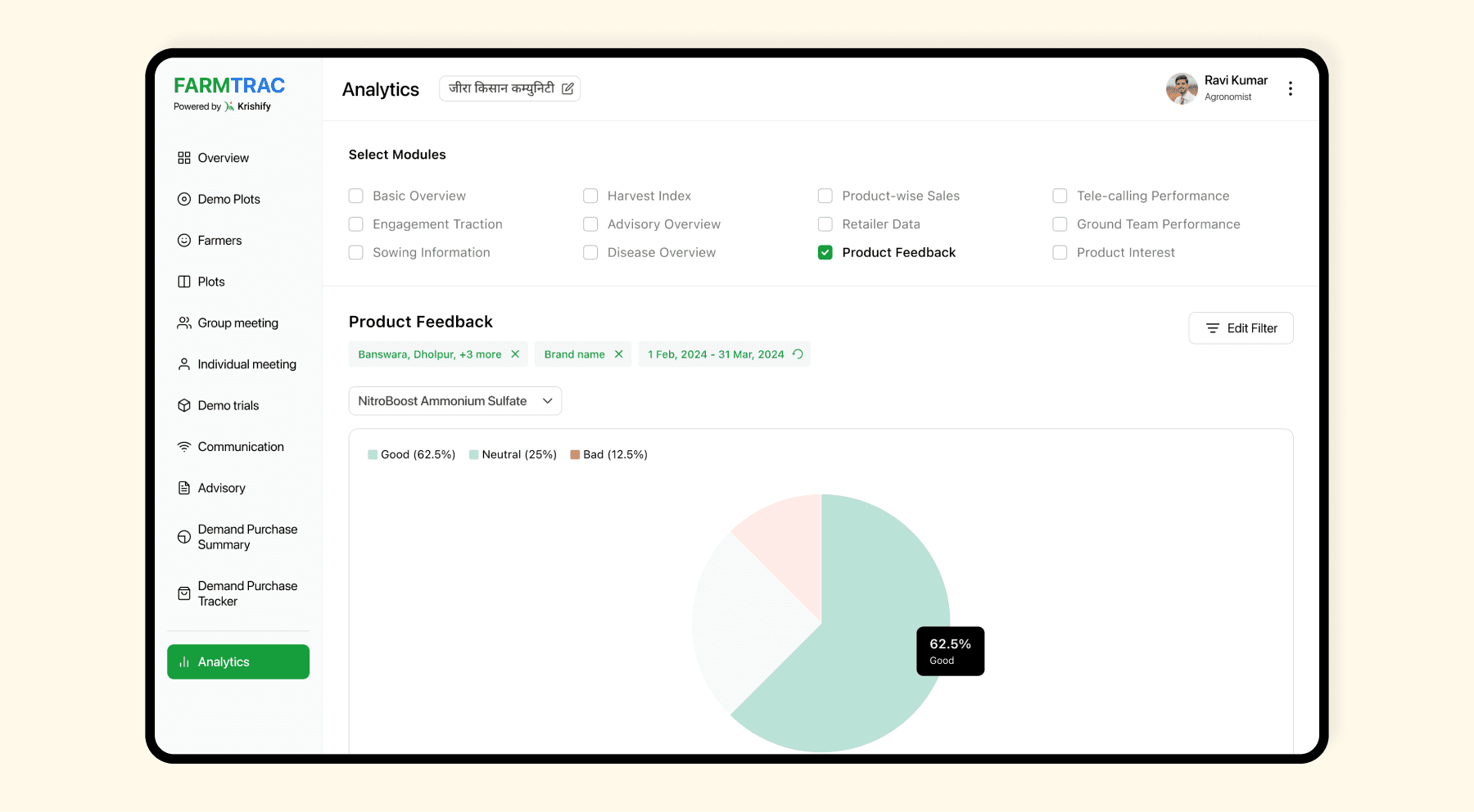
This page offers in-depth analytics with separate modules for every type of analysis the admin may need. Admins can select which modules to view at a time, ensuring the information isn't overwhelming. Each module includes its own set of filters to narrow down the data based on specific requirements.
Dashboard (Analytics)
This page offers in-depth analytics with separate modules for every type of analysis the admin may need. Admins can select which modules to view at a time, ensuring the information isn't overwhelming. Each module includes its own set of filters to narrow down the data based on specific requirements.
Krishify Website
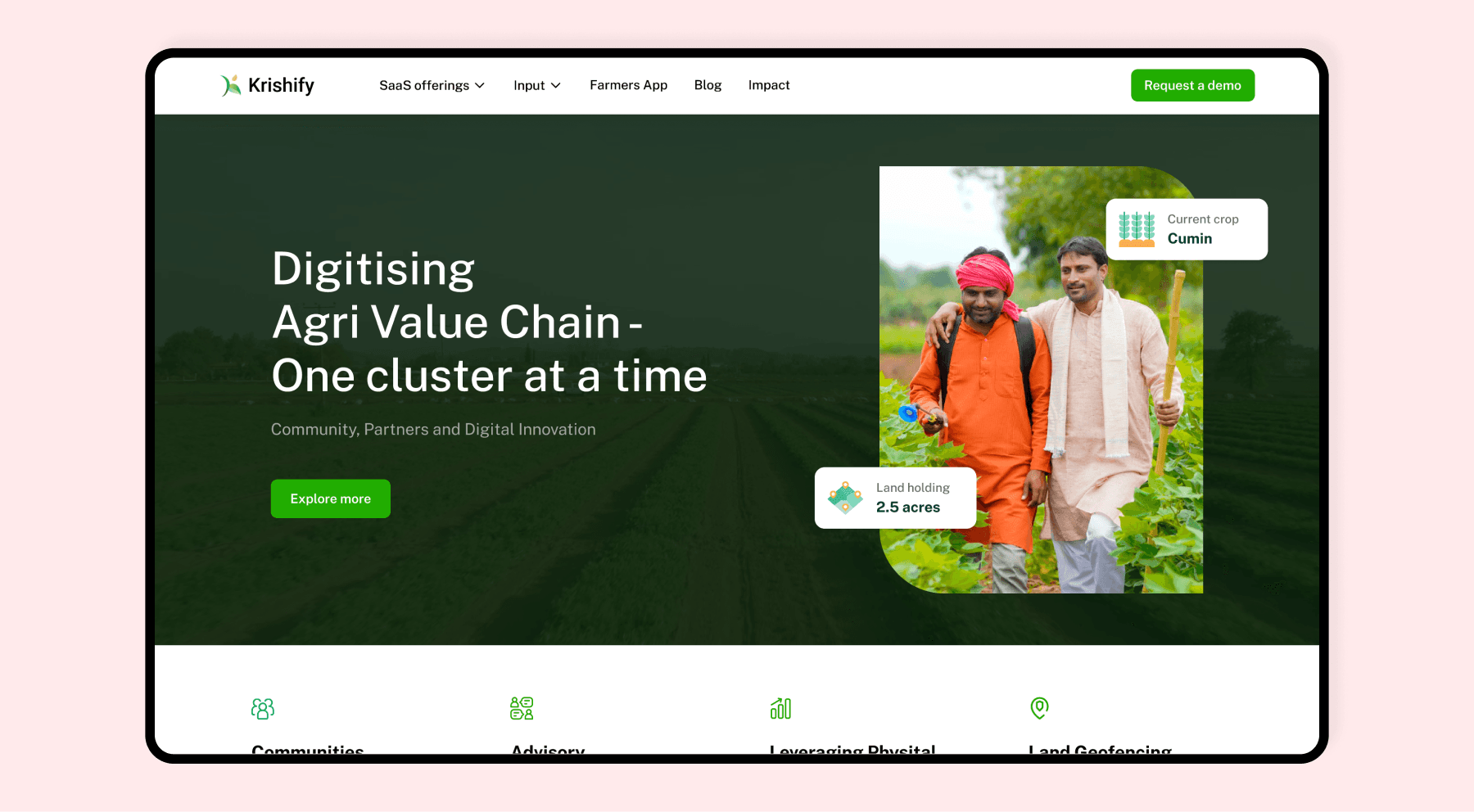
I also worked on the main website of Krishify, designing everything from the product pages (Farmtrac, Krishify app, etc.) to the blog and import report. I collaborated with a third-party development team, and the website was built using WordPress.
Krishify Website
I also worked on the main website of Krishify, designing everything from the product pages (Farmtrac, Krishify app, etc.) to the blog and import report. I collaborated with a third-party development team, and the website was built using WordPress.
